
Back to softwareMBB Software · Windows Audio

MBB Audio Mixer

Windows audio mixer with virtual microphone, music playlist, RNNoise AI noise suppression, Voice Studio, echo, monitoring and precise Mic/Music crossfader.

Windows x64 · Installer + Auto-UpdatesVersion 2.6.0Actively maintained · continuous updates
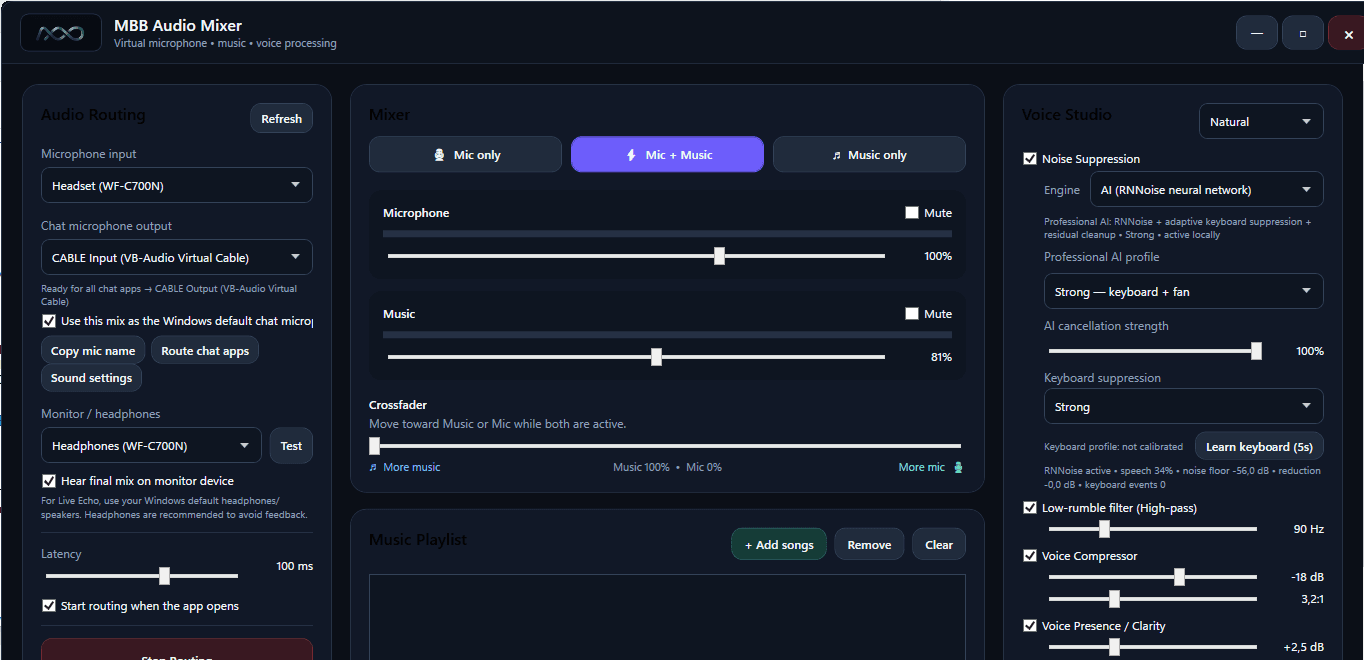
MBB Audio Mixer interface with mixer, playlist and Voice Studio

VIRTUAL MICROPHONE

One audio workflow instead of several separate tools.

MBB Audio Mixer combines microphone input, music playback, voice processing, monitoring and virtual routing in one desktop application. Chat apps can use the final mix just like a normal microphone.

MBB AUDIO MIXER

Complete feature set

The application is designed for live chats, voice rooms, streaming, meetings and other situations where voice and music need to be controlled in one combined audio output.

Audio routing & virtual microphone

  • Select the physical microphone input
  • Send the final mix through a virtual chat microphone
  • Route to chat apps and the Windows default communications input
  • Automatically start routing when the application opens
  • Monitor/headphone output for the final mix
  • Monitor test and adjustable audio latency
  • Direct access to Windows sound settings

Mic + Music mixer

  • Three modes: Mic only, Mic + Music and Music only
  • Independent microphone and music volume
  • Separate mute controls for both sources
  • Crossfader between music and microphone
  • Music 100% fully mutes the microphone bus
  • Mic 100% fully mutes the music bus
  • Post-mix level meters for the signals actually being output
  • Master output volume

Music player & playlist

  • Playlist with multiple audio files
  • MP3, WAV, AAC, M4A, WMA, AIFF and FLAC support
  • Play/Pause, Stop, Previous and Next
  • Track position and duration display
  • Seek directly within a track
  • Automatic playback of the next track
  • Remove individual tracks or clear the playlist

AI Noise Suppression

  • Local RNNoise neural-network noise suppression
  • Alternative standard SpeexDSP mode
  • AI profiles: Balanced, Strong and Studio
  • Adjustable AI cancellation strength
  • Adaptive keyboard-noise suppression
  • Keyboard levels: Off, Normal, Strong and Maximum
  • Five-second learning mode for your own keyboard profile
  • Live diagnostics for speech, noise floor, reduction and keyboard events

Voice Studio

  • Presets: Natural, Broadcast, Soft Voice and Raw
  • Low-rumble high-pass filter
  • Voice compressor with threshold and ratio controls
  • Presence / Clarity enhancement
  • Peak limiter / anti-clipping
  • Auto Ducking automatically lowers music while speaking

Echo & live monitoring

  • Echo effect on the processed microphone signal
  • Adjustable echo amount
  • Adjustable echo delay
  • Configurable number of echo repeats
  • Hear live echo through the monitor/headphone output
  • The same processed echo is sent through the virtual microphone to other participants

License & usage

  • No account sign-in required inside the desktop application
  • Privacy-preserving device ID derived from the Windows MachineGuid with SHA-256
  • Free plan with 3 routing hours per calendar month
  • Monthly subscription for €10/month
  • Monthly and annual activation codes
  • Plan, remaining time, expiry date and device ID shown directly in the app
  • Usage time is counted only while audio routing is actually active

Stability & usability

  • Windows x64 installer — no separate .NET installation required
  • Local persistence of audio settings
  • Refresh device lists and reselect audio hardware
  • Limiter and finite-sample protection against invalid audio samples
  • Automatic updates: download, installation and restart directly from the app

HOW IT WORKS

From microphone to chat in four steps.

01

Choose the microphone

Select the headset or microphone you want to use as the physical input.

02

Shape the voice

Voice Studio, AI Noise Suppression, echo and additional filters process the voice locally.

03

Mix the music

Start the playlist and control the music/microphone balance with volume controls and the crossfader.

04

Output virtually

The finished mix is delivered to the chat or voice application as a virtual microphone.

Local voice processing with control over the signal path.

RNNoise voice cleanup runs locally on the Windows PC. Your microphone audio does not need to be sent to an external AI service for neural noise suppression.

Local RNNoise

Neural noise suppression runs directly on the device.

Virtual routing

You choose the physical microphone and virtual output used by the application.

Headphone monitoring

Listen to the final mix locally before and during use.

Device-based license

The device identifier is SHA-256-derived instead of transmitting the plain MachineGuid.

LICENSE

Start free or route without a monthly hour limit.

Free€0

For testing and occasional use.

  • 3 hours of audio routing per calendar month
  • All core desktop features
  • No desktop account sign-in required
Download MBB Audio Mixer
Monthly€ 10,00 / month

For regular use without the monthly hour allowance.

  • Unlimited routing while the subscription is active
  • Activation by code
  • Annual activations are also available
Contact support

CONTINUOUS UPDATES

The application is continuously developed and regularly updated.

MBB Audio Mixer is actively maintained. Improvements to audio quality, routing, voice processing, compatibility and security are continuously incorporated into new releases.

  • Built-in check for new versions
  • Optional updates can be downloaded and installed directly from the app
  • Important releases can be mandatory and are installed automatically
  • SHA-256 verification, automatic installation and automatic restart
  • Ongoing bug fixes and feature improvements
Version 2.6.0

Download MBB Audio Mixer for Windows now.

Current version 2.6.0 for Windows x64. Initial installation uses MBB-Audio-Mixer-Setup.exe; future updates are downloaded and installed automatically by the app.

Download version 2.6.0